
@simonmayo.bsky.social
Respect the Cupboard!
(and hopefully the Cupboard will respect you back?!)
23.02.2026 21:41
👍 0
🔁 0
💬 0
📌 0
@simonmayo.bsky.social
Respect the Cupboard!
(and hopefully the Cupboard will respect you back?!)
I'm getting a 404 error too :o(
As long as Trump's personal wealth has increased 🤑 then the health of the world isn't as important 😔
Nice 👍
20% off in store this weekend when you use code "CLICK" during checkout! (excludes Raspberry Pi computers and kits): shop.pimoroni.com
Is it too early to start my Chr***mas shopping (for myself 😂).
As it's September I couldn't bring myself to type the C word! 🌲
What about the bizarre difference with watch duration for tablet users?! Are they an older demographic who are less likely to move to the next video?... or do people have a better idea? 🤔
Just watched @jdonwells.bsky.social YouTube on using @microbit.org micro:bit and servos. He pointed out the @pimoroni.com (discontinued) "Pinbetween" (pim457) pin breakout board,which I'd not seen before and looks great... so I bought two!
Yes! Me too. My daughter was most impressed... as was I. Particularly with the large Raspberry Pi ones 👏👏
I saw it as a round bale... so consider it a success
I did wonder why there was a photo of a chiller cabinet with your post... until I zoomed in 😂
Nice 👍
You are not alone friend. Should we set up a support group?
I was impressed, so I had a look... but I'm more of a Micropython than C coder. But good work 😀
Nice!
Glad you liked it.
Your starter code made the process a lot quicker and less taxing for my brain 👏👏
A much improved version!! Great work and thanks for sharing! 👍
@microbit.org @101computing.bsky.social @raspberrypiorg.bsky.social @mrlovellcomp.bsky.social @kevsmac.bsky.social
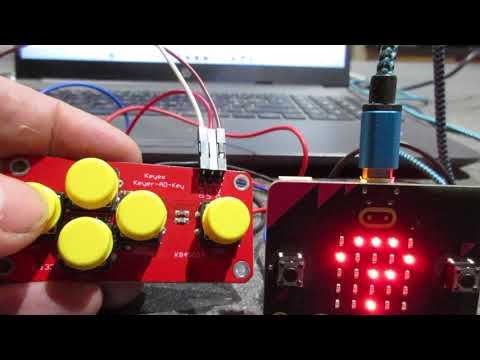
I've been distracted from making the Micro:Bit robot and I've created the classic Simon Game with a 5 button keypad; inspired by 101computing
www.youtube.com/watch?v=gw6i... Sound up!

I'll email copies of @microbit.org retro games to 5️⃣ people that either retweet this message or to new followers for 🆓 These worksheets have had lovely feedback from educators & code club leaders all over the world and you can buy them here for £5 👉 payhip.com/b/Mjegn 👾🎮😃
Fantastic 😍
I've not seen the Clue before. Is it the same form factor as the Micro:bit? It looks like a screen rather than a 5×5 matrix. Will the clue slim case fit a Micro:bit?
Thanks

Stage 1 #2 Move dot v2 gamifies the moving pixel by giving you a target to aim for.
www.youtube.com/watch?v=ARUo...
Stage 1 - get the keypad working
Stage 2 - get radio between two Micro:bits working
Stage 3 - get servos working
Stage 4 - Robot!!
I'm going to store all the python code and iterations in my new Githut
github.com/RSG72/MicroB...

@microbit.org @mrlovellcomp.bsky.social @kevsmac.bsky.social @raspberrypiorg.bsky.social
I've started playing with my Micro:bit and a 5 button board which costs about £1.
Stage 1 of 4 to make a robot!
Stage 1 #1 Move dot v1 moves the pixel around the display
www.youtube.com/watch?v=ZAtM...
Thanks for sharing
Thanks, I'd found the main() on line 143; it was more the double underscore that was new to me.
Thanks... I think I just about understand the explanation 🤔
Morning Chris
Looking at the code, the only bit I'm unsure on is
if __name__ == "__main__":
main()
I can't see a reference to __name__ or __main__ elsewhere in the code at first (or 2nd or 3rd) glance.
Is it a method of a forever loop? Is so why the double underscore?
I'm in 🙋♂️