
A step-by-step visual guide on styling a UI badge. It starts with a solid green "Success" badge, transitions to a blended dark background, highlights the text in green, adds a checkmark icon, and finally repositions the icon using "negative margin-inline-start" for better alignment.
Design better badges 🎨
14.01.2026 13:42
👍 35
🔁 3
💬 0
📌 0
This is why I believe Ariakit dot org will stay relevant for decades:
– It's always been about examples. And we'll feature multiple libraries: Ariakit React, Radix, Base UI, RAC, Headless UI, and others outside the React ecosystem.
19.06.2025 18:21
👍 14
🔁 4
💬 1
📌 1
👀
20.02.2025 02:23
👍 1
🔁 0
💬 0
📌 0
Ariakit Styles will automatically adjust selection backgrounds and text colors to ensure sufficient contrast with surrounding elements.
Usage with Tailwind CSS:
<body class="selection:ak-layer-contrast-primary">
→ "primary" can be any token from your theme. In this case, it's a mid-tone blue.
20.02.2025 01:15
👍 26
🔁 3
💬 4
📌 0

Screenshot showing six colored boxes with colored text inside.
Here's an example of ak-layer > ak-text. All texts in the same column use the same color (for example, all "yellow" elements use ak-text-[yellow]).
Ariakit automatically adjusts the color to ensure a minimum contrast ratio of 4.5:1 with the layer background.
No JS. Just CSS and color theory.
07.02.2025 11:38
👍 16
🔁 3
💬 1
📌 1
Yes, that’s the same limitation as when typing children elements.
14.01.2025 19:58
👍 1
🔁 0
💬 0
📌 0

Backing Open-Source Innovation: The POSS Fund 2024 | PRISMA
PRISMA continues its support for the open-source community with the POSS Fund 2024.
PRISMA Capacity had another round of open source sponsoring ❤️: www.prisma-capacity.eu/news/insight...
This time we made donations to @ariakit.org, @colinhacks.com's zod, @typescript-eslint.io, floating-ui.com and www.haecksen.org. Thank you all for your work.
13.01.2025 07:43
👍 8
🔁 4
💬 1
📌 0
A nice new example from @ariakitjs: Command Menu with Tabs ❤️
It has it all — tabs, multi-column layout (grid), full keyboard navigation, solid API.
ariakit.org/examples/di...
10.01.2025 10:19
👍 9
🔁 2
💬 1
📌 0

JSX code block:
<Dialog>
<ComboboxProvider>
<Combobox />
<DialogDismiss />
<TabList>
<Tab />
</TabList>
<TabPanel>
<ComboboxList>
<ComboboxGroup>
<ComboboxItem />
</ComboboxGroup>
</ComboboxList>
</TabPanel>
</ComboboxProvider>
</Dialog>

Screenshot of a Command Menu component with tabs and groups
✨ New example: Command Menu with Tabs
A command palette built with Dialog, Combobox, and Tab components from Ariakit.
Demo: ariakit.org/examples/dia...
09.01.2025 14:13
👍 22
🔁 4
💬 1
📌 0

Screenshot of a grid widget illustrating how the focusShift prop works: when enabled, pressing the arrow down key moves the focus to the nearest item in the next row even if it is not immediately below the active item.
Trying to explain @ariakit.org's `focusShift` option 🤔
09.01.2025 04:14
👍 3
🔁 1
💬 0
📌 0
💯
Another benefit is that it provides out of the box interoperability with other libraries. For example, rendering React Aria's DatePicker within an Ariakit dialog just works™, even though React Aria renders the popover outside the dialog by default.
28.12.2024 22:07
👍 1
🔁 0
💬 1
📌 0
This is true for mainstream libraries. We've benchmarked them all.
Even the native <dialog> element doesn't support this yet, as browser extensions don't use the top layer.
27.12.2024 08:08
👍 1
🔁 0
💬 1
📌 0
More context: ariakit.org/examples/dia...
27.12.2024 08:01
👍 0
🔁 0
💬 1
📌 0
The @ariakit.org dialog is the only one that lets you interact with browser extensions (like Google Translate, Grammarly, and password managers) within the dialog using either the mouse or the keyboard.
27.12.2024 07:58
👍 5
🔁 1
💬 2
📌 0
![A snippet of code that uses the element.validity.valid and element.validationMessage properties.
Full code:
const [error, setError] = useState("")
function onBlur(event) {
if (event.target.validity.valid) {
setError("")
} else {
setError(event.target.validationMessage)
}
}
<div>
<input minLength={3} onBlur={onBlur} />
<div>{error}</div>
</div>](https://cdn.bsky.app/img/feed_thumbnail/plain/did:plc:eaimln3uk5ntgmykcbxrmsyp/bafkreidsvx64fbszmusi5tt4ghc2az75orod5aqt3zndrcvxqb2matcjn4@jpeg)
A snippet of code that uses the element.validity.valid and element.validationMessage properties.
Full code:
const [error, setError] = useState("")
function onBlur(event) {
if (event.target.validity.valid) {
setError("")
} else {
setError(event.target.validationMessage)
}
}
<div>
<input minLength={3} onBlur={onBlur} />
<div>{error}</div>
</div>

A screenshot of a page shows an input filled with a single character and a styled error message stating, "Please lengthen this text to 3 characters or more (you are currently using 1 character)."
Did you know you can use the built-in browser validation API with JavaScript to control the rendering of error messages?
Along with its simplicity, you also get internationalization for free ✨
18.12.2024 19:31
👍 38
🔁 3
💬 1
📌 0

Four links visually presented as a horizontal tab list
How to determine if it's a nav with tabbable links or ARIA tabs:
Design comes first. Then, semantic HTML. If needed, ARIA follows.
Designers should first consider how users will engage with a widget and the rest of the page, always striving for the best user experience.
09.12.2024 19:53
👍 22
🔁 5
💬 1
📌 1
Running Vitest tests directly in the browser is 💯
08.12.2024 03:25
👍 5
🔁 0
💬 0
📌 0

Screenshot with two examples of a popover with drop shadows: one uses the CSS `box-shadow` property, affecting only the popover box, and the other uses the `drop-shadow` filter function, which includes the arrow element in the effect.
Here's a neat trick to create drop shadows on containers with overflow elements like arrows.
Instead of using the CSS box-shadow property, try:
filter: drop-shadow(0 3px 3px gray);
developer.mozilla.org/en-US/docs/W...
04.12.2024 21:27
👍 41
🔁 3
💬 2
📌 0

Defined Networking
Nebula Overlay Networks: Extend network access with on-demand, encrypted tunnels between any hosts on any network. Defined Networking is the company behind the Nebula open-source project.
We've been building the www.defined.net admin panel with @ariakit.org for the last several years, and really enjoy using it. It's flexible enough to style however we need it, composable enough to build complex components like a tag select-or-create combobox, and accessible to all our users.
26.11.2024 17:35
👍 6
🔁 4
💬 1
📌 0

Ariakit | Haz | Substack
Receive monthly updates about Ariakit directly in your inbox. Click to read Ariakit, by Haz, a Substack publication with thousands of subscribers.
The next @ariakit.org newsletter goes out today.
We’ll discuss the recent performance improvements on the library with some comparison numbers. There’s also more information about an upcoming Tailwind v4 theme and Black Friday discounts.
26.11.2024 11:12
👍 19
🔁 5
💬 0
📌 0
🦋
20.11.2024 09:13
👍 0
🔁 0
💬 0
📌 0
Noodling on another UI experiment with @ariakit.org, this time an animated menu inspired by YouTube's settings pane.
Feels so good to navigate without ever touching the mouse ⬅️➡️⬆️⬇️. The animations could definitely use some work!
18.11.2024 01:34
👍 14
🔁 3
💬 0
📌 1

0.4.14
Improved performance on composite widgets
Composite item components such as ComboboxItem and SelectItem now render 20-30% faster compared to Ariakit v0.4.13.
This enhancement should decrease the time needed to render large collections of items in composite widgets and improve the Interaction to Next Paint (INP) metric. We're working on further optimizations to make composite widgets even faster in future releases.
Ariakit v0.4.14 has been released with 20-30% faster composite widgets (like Combobox, Select, etc.).
Changelog: ariakit.org/changelog#0414
16.11.2024 14:12
👍 17
🔁 3
💬 1
📌 0
Hi Bluesky! Sorry for the repost, but the first thing I wanted to share with y'all is something I shared on Twitter yesterday
---
Building a Linear style filtering UI with @ariakit.org. Surprisingly simple to compose menus, selects, comboboxes, and popovers
14.11.2024 13:42
👍 16
🔁 3
💬 2
📌 1
Hi folks! I've been working on a new Command Menu example for @ariakit.org. I'm excited to share more about it soon.
13.11.2024 20:34
👍 3
🔁 1
💬 0
📌 0
Why I believe Ariakit dot org will be around for decades:
→ We can have tested examples with any library: Radix, RAC, Headless UI, MUI, and more.
→ As the web platform evolves, we'll provide examples using only native widgets, teaching you how to implement and style them effectively.
13.11.2024 11:51
👍 27
🔁 3
💬 1
📌 0

The following JSX code highlighting the `autoComplete="both"` line:
Your favorite food
<Combobox
autoSelect
autoComplete="both"
placeholder="e.g., Apple"
value={value}
onChange={setValue}
>
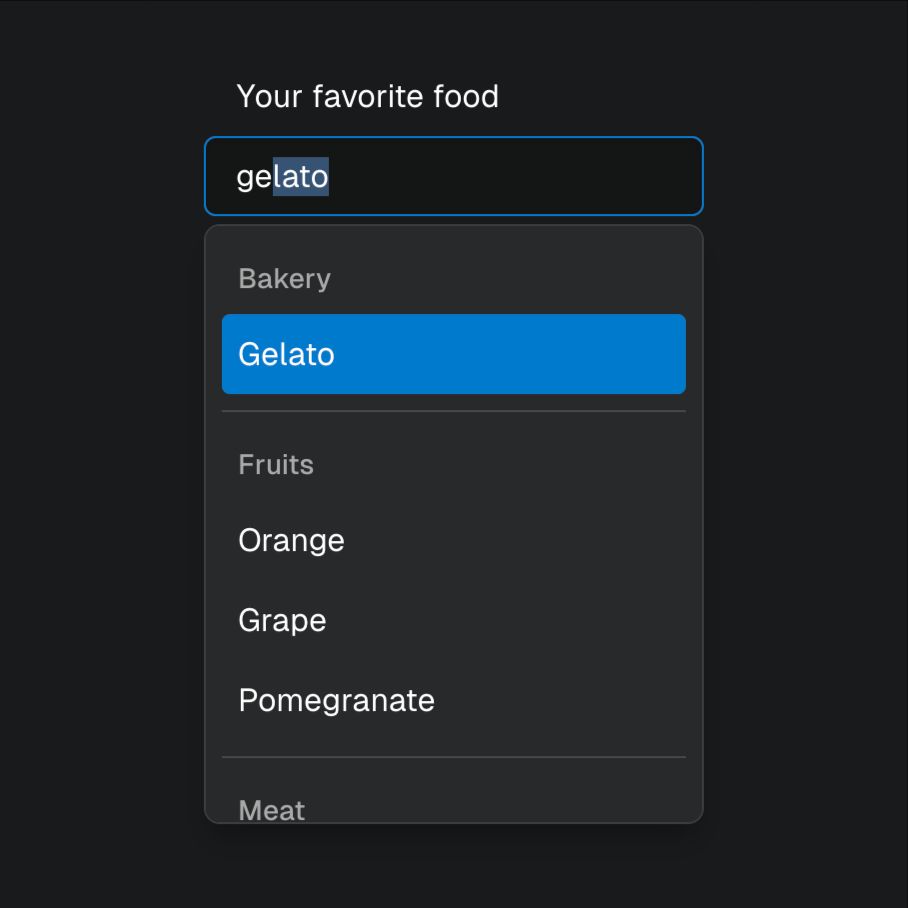
Screenshot of an open combobox widget with the value "gelato". The last 4 characters of the value are selected and the first option "Gelato" is focused.
Ariakit Combobox supports inline autocompletion with a single `autoComplete` prop, using the same API as `aria-autocomplete`
Demo: ariakit.org/examples/com...
11.11.2024 07:12
👍 12
🔁 3
💬 0
📌 0
Building something with @ariakit.org?
Share it here on 🦋 Bluesky mentioning us and we will repost.
02.11.2024 17:52
👍 8
🔁 2
💬 0
📌 0


